Deployment Overview
How to deploy blockd alongside bitcoind and Fulcrum.
blockd, bitcoind, and Fulcrum operate as a single system — but how and where they’re deployed depends on your objectives and environment. blockd sits close to the node, orchestrating bitcoind and Fulcrum locally while your application can run anywhere: on the same LAN, across a WAN, or on a remote device. The result is a single, clean endpoint — no pulling disparate RPC calls across the network to assemble a transaction list or UTXO set.
This page is primarily for:
- Platform integrators embedding blockd into a node product
- Individuals running blockd on a personal machine to build or explore Bitcoin applications
- Operators running blockd as a shared service in a private cluster
If you’re building an application on an existing blockd installation, head straight to the API pages.
The deployment topologies below differ primarily in how much separation exists between blockd, the node, and your application.
There are two topologies, with variants:
- Node integrated — blockd runs on the same machine as bitcoind and Fulcrum
- Adjacent — blockd runs separately, connecting to the node over the LAN, with variants depending on where blockd lives relative to the application
Node integrated
Section titled “Node integrated”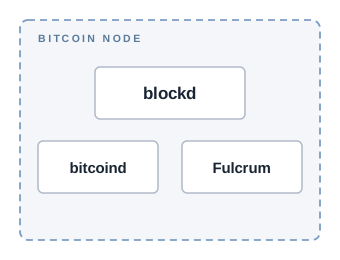
blockd, bitcoind, and Fulcrum run on the same machine. This is the natural topology for platform deployments — if you’re integrating blockd into a Bitcoin node platform, this is your starting point.
A common use case in platform deployments is a built-in dashboard — IBD progress, connected peers, watched wallets — served directly from the node and powered by blockd.
Set bitcoind.host and electrum.host to 127.0.0.1 — this is the default.
Docker Compose
Section titled “Docker Compose”Services share a user-defined bridge network. Use service names as hostnames:
services: bitcoind: image: bitcoind:latest fulcrum: image: fulcrum:latest blockd: image: blockd:latest depends_on: - bitcoind - fulcrum ports: - "21000:21000"bitcoind: host: "bitcoind" port: 8332 user: "rpcuser" pass: "rpcpassword"
electrum: host: "fulcrum" port: 50001Adjacent deployment
Section titled “Adjacent deployment”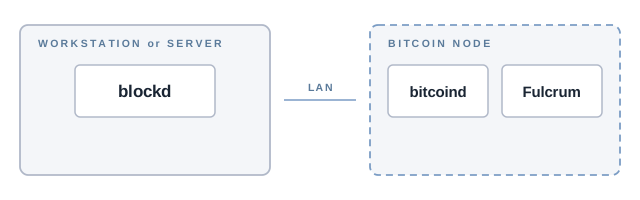
blockd runs separately and connects to bitcoind and Fulcrum over the LAN. The node’s LAN IP
is used in place of 127.0.0.1:
bitcoind:  host: "192.168.1.10"  port: 8332  user: "rpcuser"  pass: "rpcpassword"
electrum:  host: "192.168.1.10"  port: 50001
The variants below differ in where blockd lives — the configuration is the same in each case.
Application machine
Section titled “Application machine”blockd runs on the same machine as your application — a desktop or workstation — with the node on a separate machine on the LAN. This is the most accessible starting point for individuals building accounting, analysis, or other Bitcoin applications. It avoids the embedded systems knowledge required for node integration and keeps blockd close to the application consuming it.
Dedicated server
Section titled “Dedicated server”blockd runs on its own server, separate from both the node and the application. Each component — application, blockd, node — runs in isolation. This is a natural step up from the application machine topology as operational demands grow.
Cluster
Section titled “Cluster”Both node integrated and adjacent deployments can serve as the building block for a cluster. Each node in the cluster runs its own blockd instance — integrated directly on the node, adjacent on a nearby machine, or a mix of both depending on the hardware available.
Each blockd instance is independent: one port, one auth token, one node. What sits in front of them — load balancing, routing, failover — is outside the scope of this page and left to the application or infrastructure layer.
Exposing the API externally
Section titled “Exposing the API externally”blockd listens on port 21000 by default. Within a local network this is often sufficient — your application connects directly. For developers building mobile or remote applications on top of blockd, exposing the API externally is the step that makes it reachable from outside the LAN, enabling applications to connect to a private Bitcoin backend rather than a third-party service.
The two standard approaches are Tor for private remote access without a domain or open port, and SSL/TLS via nginx for domain-based access.
Tor hidden service
Section titled “Tor hidden service”HiddenServiceDir /var/lib/tor/blockd/HiddenServicePort 21000 127.0.0.1:21000sudo systemctl restart torcat /var/lib/tor/blockd/hostnamenginx reverse proxy
Section titled “nginx reverse proxy”server { listen 443 ssl; server_name blockd.yourdomain.com;
ssl_certificate /etc/letsencrypt/live/blockd.yourdomain.com/fullchain.pem; ssl_certificate_key /etc/letsencrypt/live/blockd.yourdomain.com/privkey.pem;
location / { proxy_pass http://127.0.0.1:21000; proxy_http_version 1.1; proxy_set_header Upgrade $http_upgrade; proxy_set_header Connection "upgrade"; proxy_set_header Host $host; proxy_set_header X-Real-IP $remote_addr; }}The Upgrade and Connection headers are required to proxy WebSocket connections alongside
the REST API.
Choosing a topology
Section titled “Choosing a topology”| Use case | Topology |
|---|---|
| Building a Bitcoin app on your own machine | Adjacent — application machine |
| Separating blockd from the application as load grows | Adjacent — dedicated server |
| Embedding blockd into a node platform | Node integrated |
| Self-contained environment, or Docker-based node stack | Node integrated (Docker Compose) |
| Scaling query load across multiple nodes | Cluster |
The topology depends on your objectives and use case. blockd’s flexible deployment model means you can choose how and where to run it — and how to provide applications with a unified Bitcoin node API.